
首先linux系统安装vim
yum install -y vim
然后编辑~/.vimrc,并保存
autocmd BufNewFile *.sh 0put =\"#!/bin/bash\<nl>############################################\<nl># Author:powerlgh\<nl># Organization:www.liuguohua.com\<nl>############################################\<nl>\"|$
more ~/.vimrc
autocmd BufNewFile *.sh 0put =\"#!/bin/bash\<nl>################################\<nl># Author:
powerlgh\<nl># Organization:k1.zhynet.net/down.html\<nl>################################\<nl>\
"|$
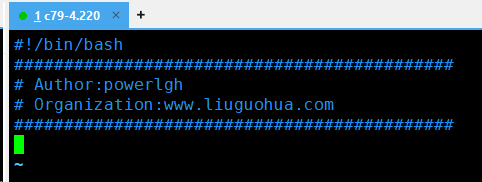
最后用vim a.sh进行测试
声明:欢迎大家光临本站,学习IT运维技术,转载本站内容,请注明内容出处”来源刘国华教育“。如若本站内容侵犯了原著者的合法权益,请联系我们进行处理。
